Run SSH and Game Servers on an Old Android Phone with Termux
This describes my setup from June 2024. Package availability and Android behavior may have changed since then.
I used Termux to run GraalVM JDK 22 for a Minecraft server, and ZeroTier so I could securely connect to the phone from anywhere over a VPN. This post describes the setup I used and the problems I ran into.
My setup was a little unusual: the old phone’s screen was completely broken, so I flashed it with fastboot and ADB and controlled it with QtScrcpy.
If you are using Linux Deploy instead of Termux, see my Linux Deploy troubleshooting notes.
ZeroTier
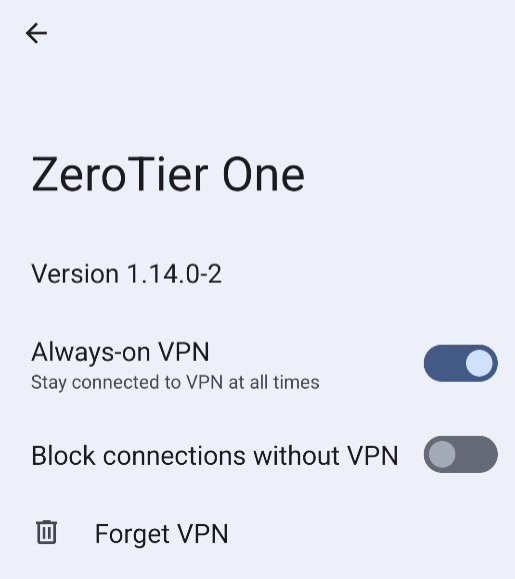
ZeroTier cannot be installed inside Termux, so install it on Android itself. To have it reconnect after a reboot, open Android’s VPN settings and enable Always-on VPN for ZeroTier One.
Termux
Install Termux and the Termux:Boot add-on. I installed both from F-Droid. At the time, I used the F-Droid packages because the GitHub Termux:Boot build’s signature caused an installation problem:
After installing Termux, run termux-change-repo and follow the prompts to select a mirror. Then update the packages:
apt upgrade
Termux can also use pacman, but apt is the default and was simpler for my setup, so the examples here use apt.
Set up SSH
Install OpenSSH:
pkg install openssh
Start the SSH server by running sshd. It runs in the background and uses port 8022 by default. Set a password with passwd, and find the Termux username with whoami. You can then connect from another device over SSH or SFTP.
Run setup commands at boot
Termux:Boot runs scripts in ~/.termux/boot when the phone starts. Open Termux:Boot once after installing it, then create the directory and a startup script:
#!/data/data/com.termux/files/usr/bin/sh
termux-wake-lock
sshd
This calls Termux’s wake-lock command to keep the CPU awake when the screen is off, then starts SSH.
If you edit the script over SFTP from Windows, save it with LF line endings. CRLF line endings will make the script fail.
Set the time zone
The date command in Termux showed the phone’s local time, but Java used the wrong time zone. I added this line to the end of /data/data/com.termux/files/usr/etc/profile:
export TZ=Asia/Shanghai
Change the value if you need a different time zone.
Install glibc support
Termux does not include glibc, so some Linux AArch64 programs will not run directly. The Termux community provides glibc packages. I used the apt-compatible packages from the glibc-packages project:
pkg install glibc-repo -y
pkg install glibc-runner -y
I needed this for GraalVM. Termux’s package repository provided OpenJDK 17, while running GraalVM directly failed because required files were missing.
After extracting GraalVM, go to its bin directory and configure its binaries to run through grun. The following loop was adapted from an issue in the project’s repository:
for i in ./*; do
    grun -t $i
done
To open a shell through the glibc runner, use grun --shell. You can also add that command to /data/data/com.termux/files/usr/etc/bash.bashrc if it suits your setup.
Configure Java
Add Java’s bin directory to your PATH. I created a shell file under profile.d with:
PATH="/data/data/com.termux/files/home/graalvm-jdk-22.0.1+8.1/bin:$PATH"
Start the servers automatically
I use screen to manage several services in separate sessions instead of using a third-party control panel. This is the simple launcher I used:
#!/bin/sh

screen -wipe

cd ~/frp
screen -dmS "frp" "./start.sh"

cd ~/redstone
screen -dmS "redstone" "./start.sh"
To run this launcher at boot, link it into ~/.termux/boot:
ln -F ./server.sh ./.termux/boot/server.sh
Android-side tweaks
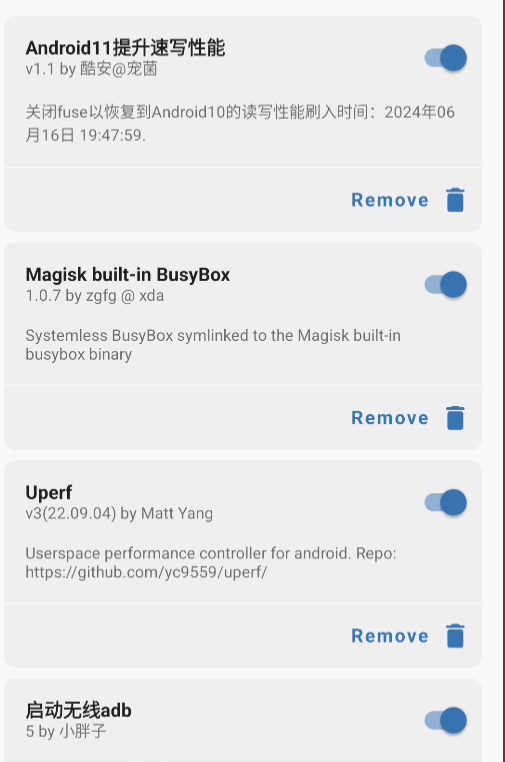
I installed a few Magisk modules from a power-user toolkit to tune the phone. I cannot say whether they actually improved performance. Android is not designed to be a server operating system.
I enabled wireless ADB so I would not have to keep moving the USB cable between a computer and a charger. I also looked for modules to disable phone features I did not need, such as face recognition, the gallery, push services, and audio services, but did not find suitable options and gave up.
Here are the modules installed on my phone: