Set a Shared Library Search Path in a Lazarus Linux Project
I was helping a friend build a Linux client for MeFrp with Lazarus and Qt 5. The application depends on libQt5Pas, and asking every user to install a compatible copy system-wide was not ideal. I wanted to ship the library in the same directory as the executable.
In a Lazarus community group, one suggestion was to put libQt5Pas in a system library directory such as /lib. Another person pointed out that the linker can be given a library search path, but could not remember the exact option. I eventually asked on the Lazarus forum: Specify the path to libQt5Pas on Linux.
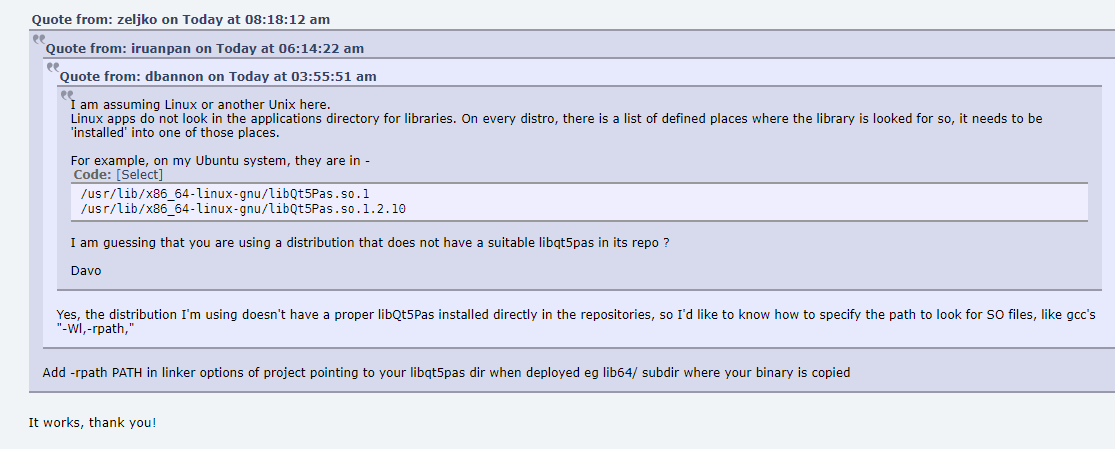
Add an rpath
In the project options, open Compiler Options → Compilation and Linking and add this linker option, replacing the placeholder with the directory that contains the shared library:
-rpath <directory-containing-the-shared-library>
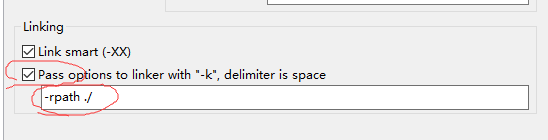
Rebuild the project. The runtime linker uses an embedded rpath when searching for shared libraries. This example uses a fixed directory; for a portable bundle with the .so beside the executable, GNU ld also supports the $ORIGIN token. Check the resulting ELF metadata with readelf -d before distributing the application, and make sure the library is compatible with the target system.
This technique is for Linux/ELF executables. It does not replace packaging a compatible shared library or satisfy that library’s own dependencies. See the GNU ld documentation for -rpath.
If Lazarus is not installed yet, see the Linux Lazarus setup note in the Chinese version of this blog.
This note was restored from the Wayback Machine on April 11, 2024.